


EMCO Remote Installer
This remote installer tool allows you to perform remote installation and uninstallation of EXE setups and MSI/MSP packages, and to audit installed software.

EMCO MSI Package Builder is a tool for a silent creation of MSI packages. It allows you to generate MSI packages that can be installed in a non-interactive mode and are ready for unattended installation over a network. You can build custom silent MSI packages or repackage existing third-party installations to the MSI format suitable for remote deployment. Generated installations can be deployed to remote PCs across a local network by using Group Policy (GPO) or EMCO Remote Installer.

EMCO MSI Package Builder is an MSI authoring tool for network administrators who need to create custom silent MSI packages or convert third-party installations to the MSI format.
EMCO MSI Package Builder helps you to benefit from unattended remote installation and deploy applications over a network faster and easier. It allows you to create silent MSI packages that are compatible with requirements defined by Group Policy and other tools for installation packages. If you have legacy installations that don't comply with those requirements, you can convert them to silent MSI packages to be able to install them remotely.
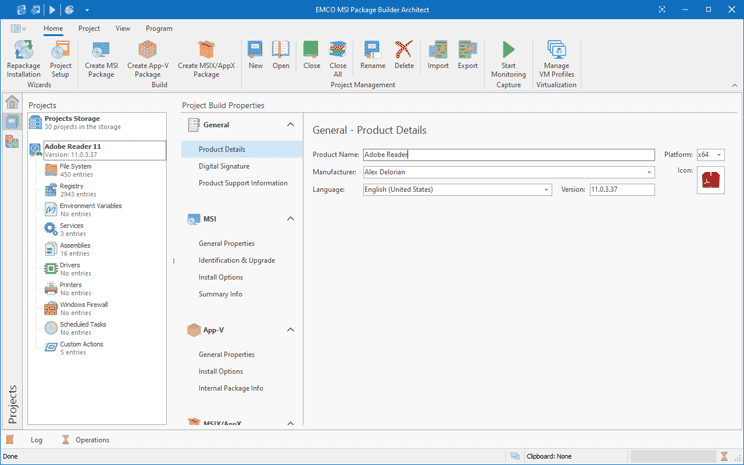
The application generates a silent MSI package that can be installed in a silent mode without displaying the installation wizard. An MSI installation has preconfigured options and doesn't require any user input. It can be transferred on a network PC by means of a remote deployment tool and installed silently.
You can convert third-party legacy installations, available as executable setup files that require interactive installation, to silent MSI packages ready for an automatic deployment. Such EXE-to-MSI repackaging can be performed in an automatic mode using the installation capturing technology that tracks installation changes.
Thus created MSI packages are ready for a silent automatic installation and are compatible with various software deployment solutions. Such packages can be installed simultaneously on multiple remote computers over a network. You can use either Group Policy or EMCO Remote Installer to deploy software remotely.
EMCO Remote Installer allows you to deploy created MSI packages on remote PCs. This tool can scan a local network to detect available PCs and installed applications, so that you can decide where to install the MSI and select the required PCs in the network tree. Specify the path to the MSI file and start an unattended remote installation.
The program is available in three editions with the different set of the features.
Compare Editions
The Professional Edition can be used to create MSI packages automatically. It includes a visual editor for a manual MSI creation and a capturing technology used to repackage legacy installations to the silent MSI format automatically.
The Enterprise Edition is an advanced MSI authoring tool that can be used to create and repackage complex installations. It features options for managing system services and environment variables, and allows repackaging installations that use the said resources.
The Architect Edition includes all the available MSI repackaging and MSI authoring features that allow creating silent MSI packages. This edition can also generates App-V, MSIX/AppX packages from the same project data, so you can choose to generate an MSI package, App-V and MSIX/AppX package depending on your needs.